
 (800) 854-6735
Ever stare at a blank content calendar wondering where to start? Templates help you skip that feeling entirely so you’re never starting from scratch and always have a plan. They give your team structure, save time, and make sharing content feel like second nature, not another task on the list.
Get 6 social media templates you can plug in, personalize, and start using today, plus a few reasons you need these simple shortcuts in your social media marketing toolkit.
Why Templates Matter in Social Media Marketing
Start Every Process from a Proven, Repeatable Foundation
Templates take the chaos out of social media marketing. Instead of scrambling for ideas or reinventing every caption, templates give social media managers a repeatable structure to rely on for each step of the content planning and creation process. That means more time for content creation, audience engagement, and strategy with less time battling a blank page.
Keep Brand Strategy Consistent
Good social media templates also keep teams on the same page. They make it easier to plan ahead, stay consistent across social platforms, and align social media campaigns with your business goals. When everyone knows the plan and can see the path forward, social media efforts move faster with fewer missteps.
Templates also reduce errors by helping you define roles, set clearer expectations, and hand off work without the usual back-and-forth.
Make Employee Advocacy Truly Easy
When you share your customizable social templates with employees, they suddenly have brand-ready social media content they can post on their personal profiles to extend your reach on every network. That’s an instant boost for your social media presence.
Users trust posts that come from people more than they trust posts from company pages. With templates, your team can easily share posts that stay within brand guidelines to help your company build real engagement and look more authentic online.
Simply put: templates save time, remove friction, and give your team a stronger foundation to create content that actually connects with your target audience.
Template 1: Social Media Campaign Brief Template
A good campaign brief keeps your entire campaign on track. Instead of juggling ideas in different docs or trying to remember who’s doing what, a brief pulls everything into one place—your objectives, target audience, messaging, channels, timeline, and KPIs. It’s the roadmap your team can rely on from kickoff to final results.
Using a campaign brief template makes it easier to define your goals upfront and ensures every post ladders back to your bigger goals. It also gives you a clear reference point when measuring performance later: what worked, what didn’t, and what you want to repeat next time.
Here’s an easy starter template for social campaign briefs:
Objective → Audience → Message → Channels → Timeline → KPIs → Roles
Campaign Name: [Insert campaign title]
Objective(s): [What are you trying to achieve? Examples: increase awareness, drive event registrations, promote new content]
Target Audience: [Who is this campaign for? Note demographics, interests, job roles, or key traits]
Key Message(s): [1–3 core messages you want every post to reinforce]
Social Channels: [Which social platforms will you use and why?]
Content Plan: [Outline the types of posts included: videos, carousels, photos, thought leadership, employee advocacy posts]
Timeline: [Start date → end date + major milestones]
KPIs & Success Metrics: [What will you measure? Examples: engagement rate, link clicks, impressions, conversions]
Roles & Responsibilities: [Who is creating, reviewing, approving, and posting content?]
Notes & Approvals: [Any required approvals, compliance notes, or brand guidelines]
Template 2: Social Media Content Calendar Template
A content calendar gives social media managers something priceless: a clear plan. No more coming up with last-minute ideas or repeating the same posts when you have a calendar that lays out what you’re posting, where it’s going, and how it supports your broader strategy.

It keeps your social media content balanced by mixing promotions, education, and engagement-driven posts.
Adding key dates (product launches, holidays, events, and trending topics) helps you plan ahead and tap into timely moments your audience actually cares about. A solid calendar also spreads the workload evenly across your team so no one is stuck creating 5 posts the night before they’re due.
Use this basic template to fill out your content calendar for easier posting:
Platform → Post Type → Asset → Post Time → Scheduled?
Platform: [Where will you post the content: LinkedIn, Facebook, Instagram, X, etc.]
Post Type: [Promotional, educational, engagement, thought leadership, etc.]
Asset: [Which asset will you link to, if any?]
Post Time: [Use each network’s best time to post or let AI pick for you]
Scheduled? [Y/N: Mark when the post is officially scheduled for each network]
Need something more detailed? Use our Social Media Content Strategy Template.
Creating a B2B Content Strategy for LinkedIn
Struggling to reach your audience on LinkedIn? Master your B2B content strategy with a step-by-step guide.
Template 3: Social Media Copywriting/Post Template
Writing great social media copy takes time and skill, but a solid template means you can do it faster. A post template gives your team a repeatable structure for captions, hashtags, CTAs, and any compliance or disclosure notes your industry requires.
It keeps posts clear, engaging, and consistently aligned with your brand voice while still leaving room for creativity across platforms.
Using a copy template also speeds up content creation. Social media managers, writers, designers, and approvers all work from the same framework, making it easier to produce posts quickly and keep your social media efforts aligned.
Below is a simple social copywriting template your team can use to draft any post:
Post Caption → Hashtags → CTA → Asset Link → Approved?
Post Caption: [Write manually or with the AI Caption Generator. Keep it clear and aligned with your brand voice.]
Hashtags: [List relevant hashtags. Choose a mix of branded, industry, and topic-specific tags.]
Call-to-Action (CTA): [What should the audience do next? Click, comment, share, register, download, etc.]
Asset Link: [Optional: Insert the link, image, document, or video reference.]
Approved? [Y/N: Indicate when the designated approver has signed off on the copy.]
Template 4: Social Media Reporting & Analytics Template
Tracking what works (and what doesn’t) is how you build an effective social strategy. If you’re not using a tool like Clearview Social with built-in reporting tools, a reporting template pulls all your key metrics into one place—engagement, reach, follower growth, clicks, conversions, and more—so you can quickly see how your social media efforts are performing.
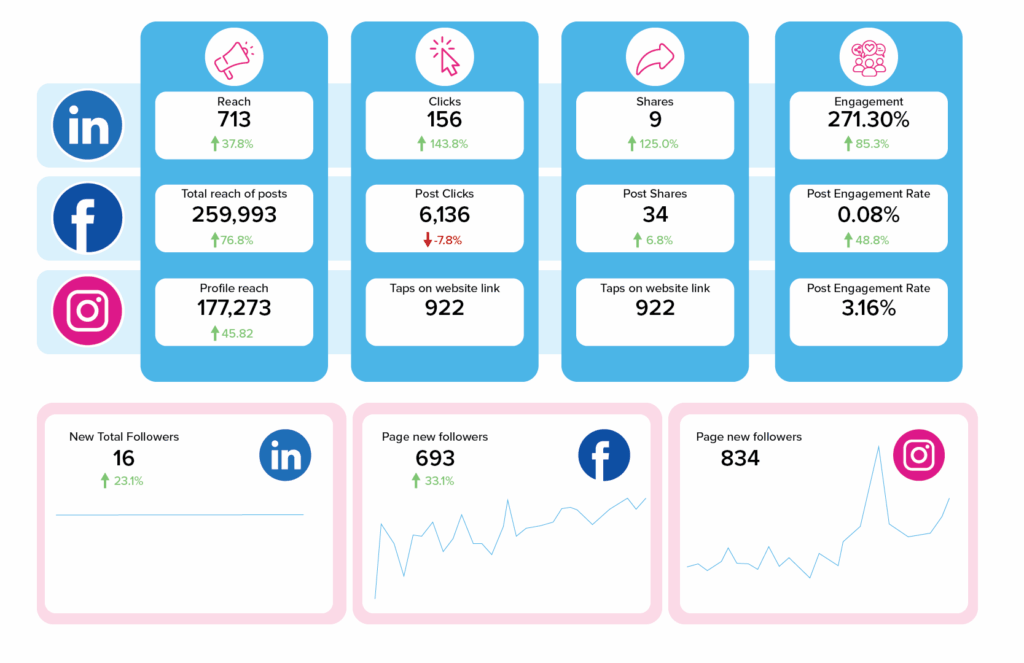
A consistent template makes it easier to spot trends, understand which content resonates with your audience, and measure how your work supports broader business goals. It also keeps stakeholders in the loop by showing the real impact of your social media presence through clear, repeatable insights.
Below is a general social media analytics template your team can use monthly or weekly.
Reporting Period → Performance Overview → Engagement → Conversions → Next Steps
Reporting Period: [Week/Month/Quarter]
Platforms Covered: [LinkedIn, Facebook, Instagram, X, etc.]
Performance Overview: [Total posts, best-performing post, platform metrics, biggest insight, etc.]
Engagement Metrics: [Likes/reactions, comments, shares, reach, Earned Media Value, followers, profile views, etc.]
Traffic & Conversions: [Link clicks, landing page visits, conversions (downloads, signups, leads, etc.)]
What Worked Well: [Highlight themes, formats, platforms, or topics with strong performance.]
Needs Improvement: [Identify weak-performing content or trends worth adjusting.]
Next Steps: [List action items for the next reporting period.]
Template 5: Social Media Policy Template
A social media policy gives your team clarity and confidence to post as your brand—and as employee advocates. It outlines what’s appropriate to share, how the team should represent your brand online, and the guardrails that protect confidential information.
A strong policy also explains your approval process, how to respond to negative comments, and what to do if a crisis or misinformation arises. When everyone knows the rules, they show up better on social—and your brand does, too.
Build your own social media policy from this template:
1. General Guidelines
- Represent the brand professionally and respectfully.
- Be accurate and thoughtful when posting about industry topics or company work.
- Disclose your affiliation with the company when sharing work-related content (if required).
2. Confidentiality & Privacy
- Do not share confidential company information.
- Avoid discussing internal details, financials, or private conversations.
- Respect client privacy and industry-specific regulations.
3. Content Sharing & Approval
- Follow brand voice and style guidelines.
- Use approved assets, messaging, and hashtags when posting about the company.
- If required, submit posts for approval through: [Insert platform/process—email, Slack, Clearview Social, etc.]
4. Employee Expectations
- Engage respectfully with others online.
- Avoid posting content that could be offensive, discriminatory, or harmful.
- Personal accounts should not imply official company statements.
5. Responding to Feedback & Issues
- Stay calm, professional, and factual when engaging with comments.
- Do not argue publicly with customers or competitors.
- Escalate negative or sensitive comments to: [Insert contact or department]
6. Crisis Communication
- During emergencies or major company events, only designated spokespeople may post updates.
- Follow internal guidance from leadership or communications teams.
- Report misinformation or potential PR issues immediately.
7. Legal & Compliance Notes
- Follow all applicable laws, regulations, and industry rules.
- Include required disclosures when discussing products or services.
- Adhere to copyright and usage rules for images, videos, and music.
8. Contact for Questions
- Add the name/email of the person or team who manages social media governance.
Ultimate Buyer’s Guide to Employee Advocacy: Leveraging Your Team’s Network to Scale Your Business
Employee advocacy software makes social media sharing pain-free for your employees. With the right software tools at your disposal, employee
advocacy can be both effortless and effective.
Template 6: Employee Advocacy Sharing Template
Employees only want to share content when it’s easy, relevant, and true to their voice. An employee advocacy template gives them exactly that: a set of pre-approved posts, hashtags, and quick personalization prompts they can use to amplify your brand on their own social networks.
A good template removes the friction that stops employees from sharing. It shows employees what to share, how to share it, and how to make it their own in seconds with unique captions. You get more authenticity, broader reach, stronger brand trust, and an employee base that feels confident representing your company online.
Below is a ready-to-copy employee advocacy template your team can plug into your workflow immediately.
Post Options → Suggestions → Link → Image → Notes → Where/When to Share
Post Option 1: [Insert pre-written post text employees can share as-is.]
Post Option 2: [Insert an alternate caption with a different angle, tone, or length.]
Personal Touch (Optional): [Why this topic matters to you, quick win or takeaway. customer success moment, personal insight related to the post]
Suggested Hashtags: [#ExampleHashtag, #IndustryTag, #CompanyTag]
Link/Asset to Share: [Insert URL, document, or social media link]
Image/Video Included: [Y/N—Attach file if applicable]
Compliance or Notes (If Needed): [Add disclosure or industry guidance where required]
How to Share: [Copy the text above, add your personal note (optional)
Social Channel(s): [Designate: LinkedIn, Facebook, Instagram, X, TikTok, etc.]
Best Time to Share: [Suggest day/time or instruct employees to let PeakTime™ handle it.]
This employee advocacy template is powerful, but Clearview Social rolls all of this into one seamless, automated process. Your team gets pre-approved content, one-click sharing, suggested hashtags, PeakTime™ scheduling, and automated reporting—all in one place.
No chasing posts, no extra steps, no friction. Just effortless employee advocacy that actually gets results.
Tips for Customizing Your Templates
- Align with your brand voice: Use language, tone, and visuals that sound like you. Your templates should feel unmistakably on-brand, whether the content is educational, promotional, or culture-driven.
- Adapt for each platform: Every social channel has its own rhythm. Tailor versions of your templates for LinkedIn, Facebook, Instagram, X, and others so your content fits naturally wherever it’s shared.
- Clarify ownership: Spell out who creates content, who approves it, and who posts it. Clear roles keep your social media efforts running smoothly and prevent bottlenecks.
- Refresh regularly: Social media moves fast. Revisit your templates often to ensure they reflect current trends, new features, and shifting business goals.
- Learn from your team: Ask the people using your templates what’s working and what could be easier. Their feedback helps you improve usability and create templates that actually get adopted.
Templates Get You Started—Here’s How You Scale
These 6 social media templates give your team structure, clarity, and a faster path to great content. But when your workflows grow, you need more than a set of outlines to keep driving results. You need a system that brings everything together.
Clearview Social brings the plug-and-play ease of templates to your social strategy. With one tool, you get an effortless, repeatable process your whole team can follow. With intuitive features that help you (and your employees) share and schedule approved content with one click, write captions with AI, and double your reach, you spend less time managing posts and more time seeing results.
Give your team more than templates—give them a platform built to amplify your brand. Get a quick, personalized demo now and we'll show you exactly how it works for your team.
Create a Winning Social Media Program
 Boost your brand’s social media reach and get your employees sharing company content with a powerful, all-in-one employee advocacy software.